IFS SCRM 12.13
Release Date: September 11, 2024This release includes several enhancements and new features that will provide greater control and flexibility across your accounts, tasks, quotes, reports and more. Here’s a detailed list of all the latest features and enhancements released on September 11, 2024.
What's New?
Account Access
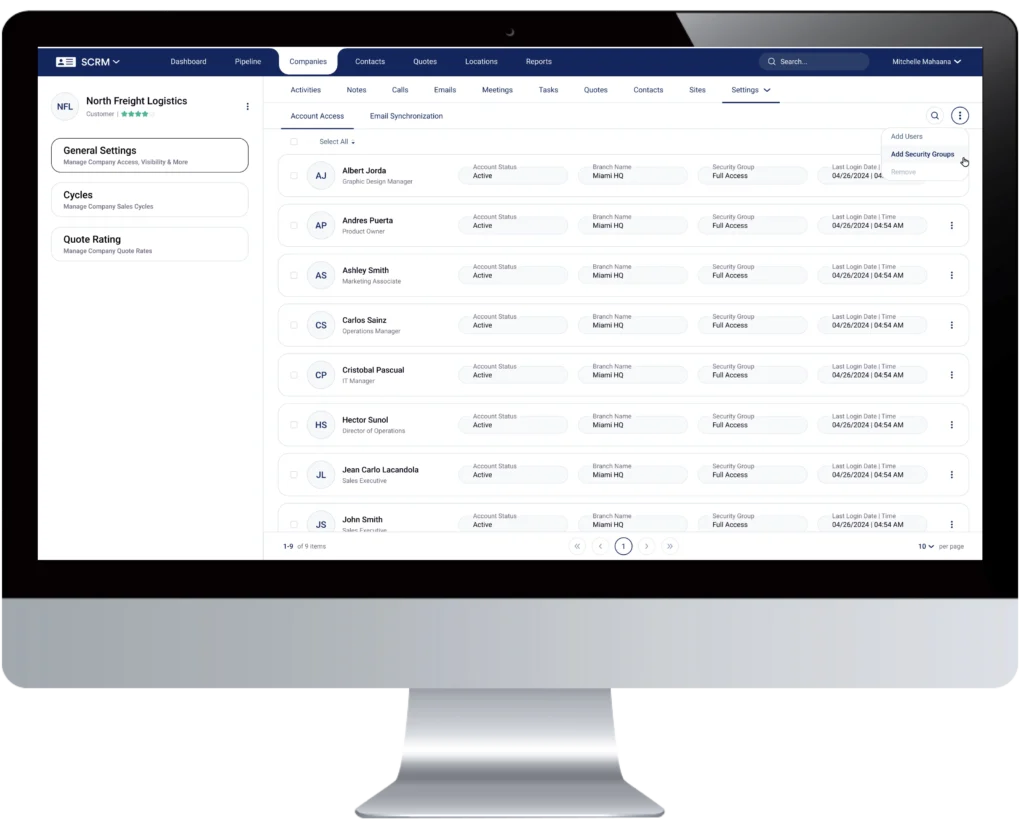
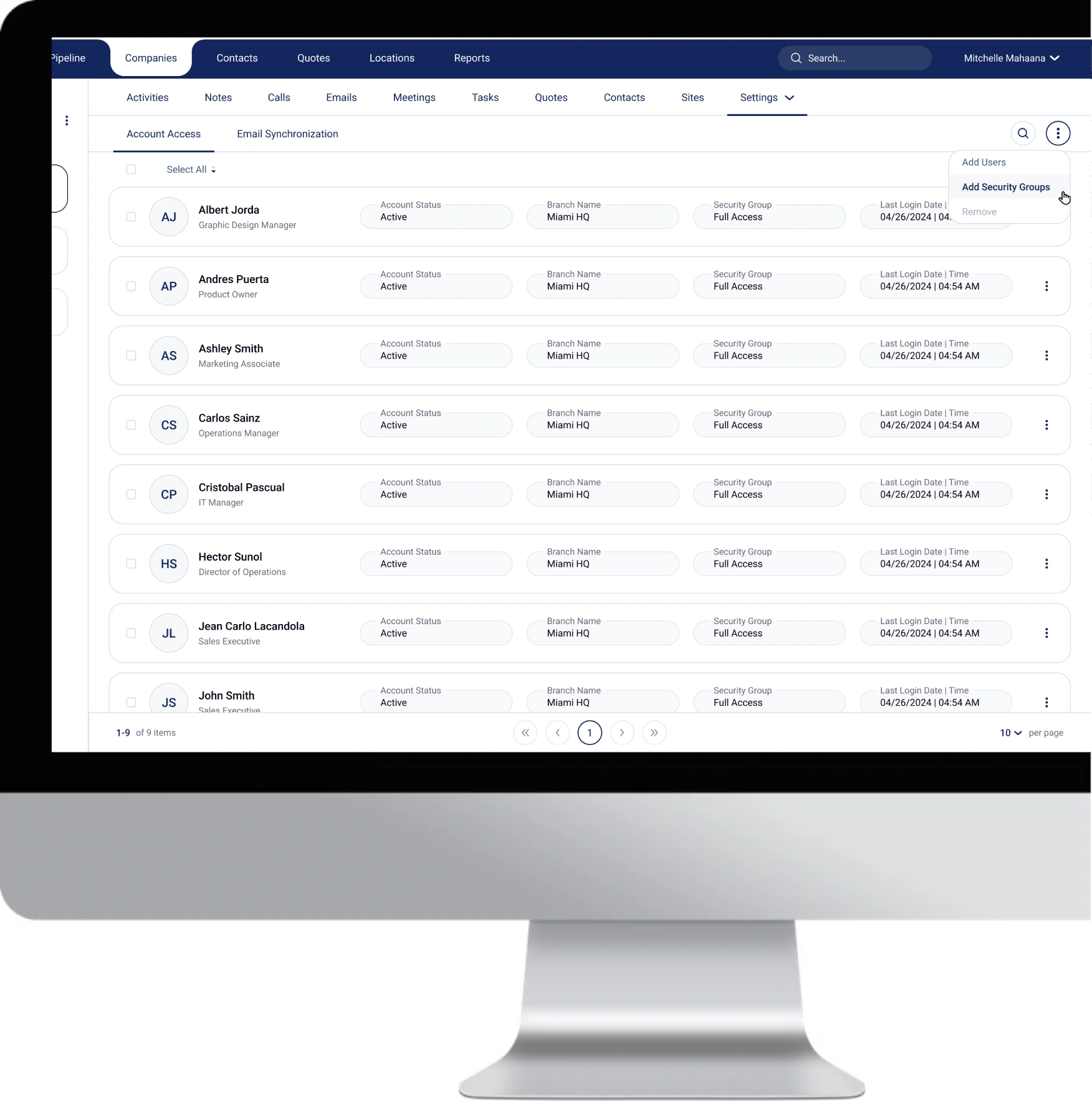
- The new Account Access functionality offers enhanced control over who can view specific accounts (companies & contacts) within SCRM. With this feature, admins can define account visibility for individual users and groups.
- Manage visibility by individual users or user groups.
- Configure visibility at the company level (Company > Setting > General Settings > Account Access) or from the Companies list (by selecting the desired companies, Edit > Account Access). Only Admin tenants can modify account access from the Companies list.
- Security profiles have been renamed to Security Groups. These groups will continue to control access to accounts and maintain previous security functionalities.
- Manage Security Groups from the Admin module (Admin > Users & Security > Security Groups).
- All existing security profile configurations remain unchanged.
- Control who has access to the Account Access tab at the company level from Security Groups. By default, no one has access, so this will need to be configured manually.
- Current customers will see their security groups automatically added to Company Account Access. Modifications can be made to remove groups or users as needed.
- For newly created companies, only the creator and key stakeholders (Sales Owner, Customer Service Owner, and Tracking Team Owner) will have automatic account access.
- Only users with account access will be able to see contacts linked to that account.
- In future updates, account access/visibility settings will also apply to company-specific data such as revenues, gross profits and more.
Sales Pipeline Report
- Track the number of companies by pipeline stage and analyze trends using three chart types: Line, Clustered Columns, and Stacked Columns.
- Drill down into any data point to see detailed company breakdowns, including when they were moved to each stage, the date, and the responsible user.
Task Templates
- You can now create task templates for recurring tasks, making it more efficient and effective to set up frequently used tasks.
- Task templates can be defined in the Admin module by navigating to Admin > Settings > Documents, Templates & Logos > Tasks.
Export Capabilities
- Users with the appropriate permissions can now export companies and contacts from the 3-dot action menu under Companies or Contacts.
- Admins can define who has export privileges for companies and contacts via the Admin module (Admin > Group > Account Access Level).
- The ability to export quotes will be included in the next release cycle.
Improvements
Dashboard Filter Visualization
- We've improved the dashboard filter experience, making it easier to view and modify filters.
- When users select a filter in the dashboard, they can now easily see the selected filter and modify it as needed.
Dashboard To Do Tasks
- When working with tasks in the dashboard (To Do), you can now click on the subject of a task to open it directly and start working on it right away.
Reports Enhancements
- Added "Stacked Columns" visualization to the following reports: Awarded Lanes by Customer, Customer Service Owners Activities, Sales Owners Activities, Sales Owners Avg Awarded Lane Deal Size, and Companies by Pipeline Stage.
Tasks Tab Security
- We’ve introduced more granular security settings for tasks at both the company and contact levels
- Administrators can now define who can create, edit, and delete tasks at these levels for increased control.
Quotes Security
- Define permissions for creating, viewing, and deleting quotes from the Quote list.
- Specify who can edit or delete quotes from within the quote form itself.
- Define who can create, edit, and delete calls in the Quotes tab of a quote, giving you even more control over call management within quotes.
New Task Type (To-Do):
- To address a broader range of tasks, we’ve introduced a new task type: "To-Do". This addition helps users manage tasks that require a specific action.
Email “To” Field
- When creating an email, the “To” field will now automatically populate with all contacts from the selected company, as well as systems’ users.
We hope these new features will enhance your experience with IFS SCRM, providing you with more flexibility and control in managing your business. If you have any questions or need further assistance, please reach out to our support team.
Other Product Updates & Release Notes
IFS SCRM 12.19
Release Date: December 2, 2025
This IFS SCRM release introduces Custom Quotes for non-standard services, item-level profitability tracking, and powerful...
READ MOREIFS SCRM 12.18
Release Date: August 4, 2025
This release introduces several enhancements focused on improving reporting capabilities, streamlining user workflows, and strengthening...
READ MOREIFS SCRM 12.17
Release Date: May 29, 2025
This release introduces powerful new functionalities—Custom Dashboards, Mailchimp Integration, and Email Tracking—designed to enhance visibility,...
READ MOREIFS SCRM 12.16
Release Date: March 20, 2025
This release introduces a new module: the Workflows Automation module – beta version. This new...
READ MOREIFS SCRM 12.15
Release Date: January 17, 2025
This new release of SCRM introduces exciting new features such as Custom Reports and enhancements...
READ MOREIFS SCRM 12.14
Release Date: November 14, 2024
This new release of SCRM introduces exciting new features and enhancements to boost visibility, accountability,...
READ MOREIFS SCRM 12.12
Release Date: July 10, 2024
IFS SCRM 12.12 introduces significant enhancements to note management, new functionalities, and improvements to streamline...
READ MOREIFS SCRM 12.11
Release Date: May 29, 2024
IFS SCRM 12.11 now allows users to customize the Company form to display information that...
READ MOREIFS SCRM 12.10
Release Date: April 17, 2024
IFS SCRM 12.10 now shows Customer and Carriers’ lanes history. The release also includes several...
READ MOREIFS SCRM 12.9
Release Date: February 29, 2024
IFS SCRM 12.9 can now manage all your supply chain stakeholders (agents, consignees, shippers, suppliers,...
READ MOREIFS SCRM 12.8
Release Date: January 18, 2024
IFS SCRM 12.8 now enables access to a new historical ‘Lanes’ tab. This feature displays...
READ MOREIFS SCRM 12.7
Release Date: December 12, 2023
IFS SCRM 12.7 now integrates with Freight Management Systems' (FMS) cloud TMS, LOADPlus Pro. The...
READ MOREIFS SCRM 12.6
Release Date: October 20, 2023
IFS SCRM 12.6 introduces new sales pipeline widget features. The new widgets allow users to...
READ MOREIFS SCRM 12.5
Release Date: September 7, 2023
IFS SCRM 12.5 introduces the ability to create custom fields for companies, contacts, and quotes....
READ MOREIFS SCRM 12.4
Release Date: July 26, 2023
IFS SCRM 12.4 introduces automatic Gmail synchronization, pipeline KPIs, and two new sales reports. Gmail...
READ MOREIFS SCRM 12.3
Release Date: June 14, 2023
IFS SCRM 12.3 introduces the ability to upload files and integrate with Gmail. Uploading files...
READ MOREIFS SCRM 12.2
Release Date: May 4, 2023
IFS SCRM 12.2 introduces a new way to view the pipeline and two new reports....
READ MOREIFS SCRM 12.1
Release Date: March 14, 2023
IFS SCRM 12.1 now supports inbound and outbound calls. Users can now make and receive...
READ MOREIFS SCRM 12
Release Date: February 6, 2023
IFS SCRM 12 introduces phone system integration, allowing users to make calls from the application...
READ MOREIFS SCRM 11.1
Release Date: December 29, 2022
IFS SCRM 11.1 introduces new activity shortcuts, reports, and free license upgraded capabilities. Additionally, this...
READ MOREIFS SCRM 11
Release Date: December 8, 2022
IFS SCRM 11 introduces two new major features, Reports and Locations (Shippers & Consignees). Reports...
READ MOREIFS SCRM 10
Release Date: October 13, 2022
IFS SCRM 10 introduces FCL as a new service when creating quotes. This release also...
READ MOREIFS SCRM 9.3
Release Date: September 8, 2022
IFS SCRM 9.3 introduces the functionality to assign user licenses in the admin module independently....
READ MOREIFS SCRM 9.2
Release Date: August 16, 2022
IFS SCRM 9.2 features integration with TomTom, a major routing tool in the market. This...
READ MOREIFS SCRM 9.1
Release Date: July 14, 2022
IFS SCRM 9.1 introduces new follow-up features. This release also includes multiple improvements and convenience...
READ MOREIFS SCRM 9
Release Date: June 15, 2022
IFS SCRM 9 introduces LCL to the quoting module. This release also includes enhancements to...
READ MOREIFS SCRM 8.1
Release Date: May 23, 2022
IFS SCRM 8.1 introduces new features such as creating follow-up tasks when logging a call...
READ MOREIFS SCRM 8
Release Date: April 26, 2022
IFS SCRM 8 introduces the Sales Pipeline feature to help users manage their sales process...
READ MOREIFS SCRM 7.4.1
Release Date: March 24, 2022
IFS SCRM 7.4.1 introduces new features such as expanding dashboard lists and keyboard navigation improvements...
READ MOREIFS SCRM 7.4
Release Date: March 7, 2022
IFS SCRM 7.4 introduces features such as email follow-ups, the ability to upload company logos,...
READ MOREIFS SCRM 7.3
Release Date: February 10, 2022
IFS SCRM 7.3 introduces Global and Company Quote Ratings for LTL and Intermodal. The release...
READ MORE